
Agent pane
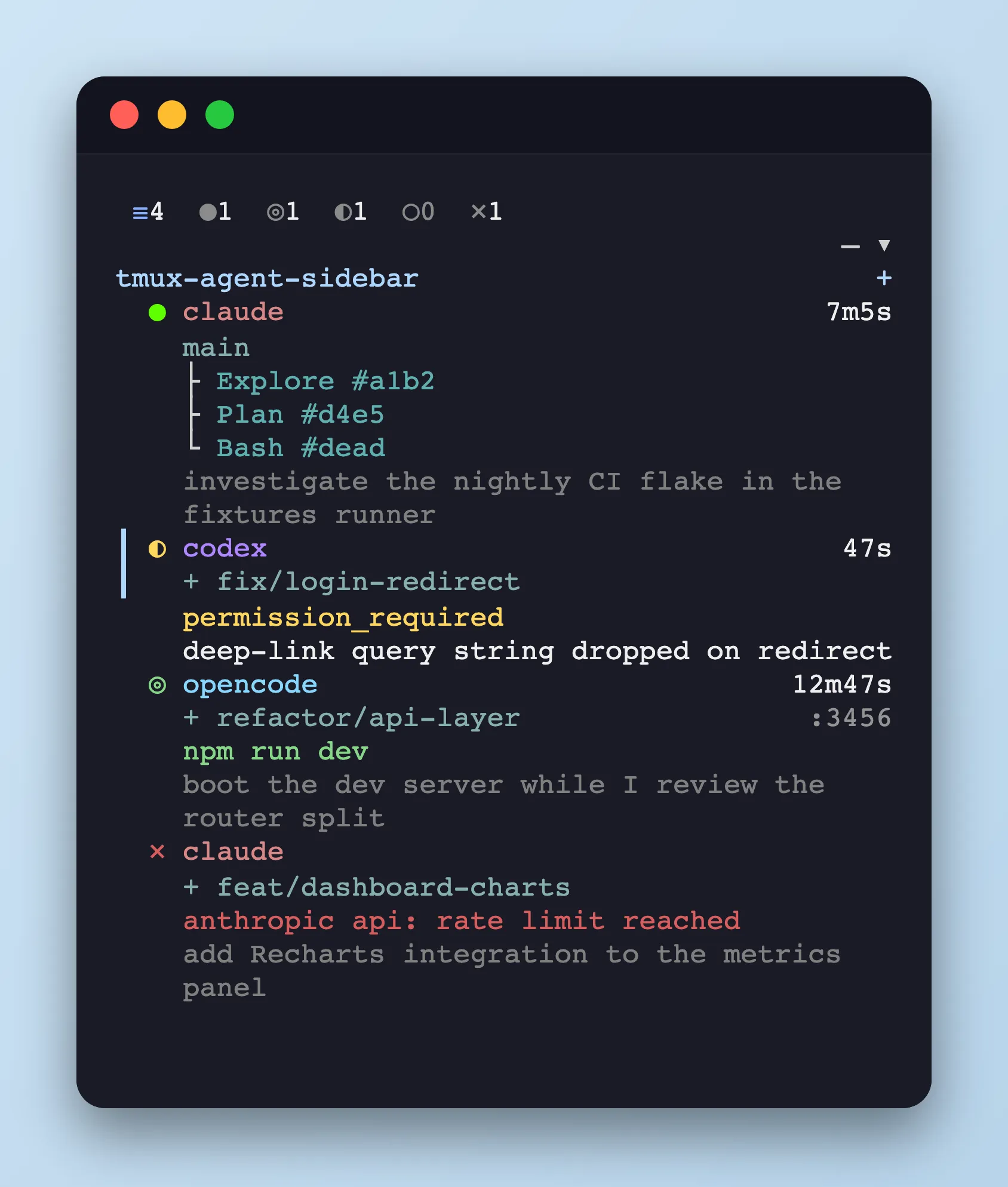
The sidebar renders one row per agent pane across all tmux sessions and windows. Each row is packed with live metadata pulled from the agent’s hooks and from tmux itself.
Filter bar
Section titled “Filter bar”The top row of the sidebar filters the agent list by status. Each entry is an icon + live count; selecting one hides rows whose status doesn’t match.
Status filter
Section titled “Status filter”≡N— all panes●N— running◎N— background shell running◐N— waiting○N— idle✕N— error
Cycle with h / l (or ← / →), or click an entry. Tab advances through the filter one step at a time.
Repo filter
Section titled “Repo filter”Below the status row, a repo selector (▾) narrows the list to a single repository. Open it with r or by clicking the arrow; — means no repo filter is active.
Row elements
Section titled “Row elements”Status icon
Section titled “Status icon”●running◎background shell running◐waiting○idle✕error
When multiple signals compete on the same pane, the sidebar resolves them in this order:
running > permission > background > waiting > idle
- running always wins while the agent is actively using tools — it overrides any background shell or waiting notification for the duration of the tool call.
- permission (a
permission_prompt,permission_denied, orelicitation_dialogwait reason) overrides a live background shell. You still have to act on the prompt, so the row stays inwaitinginstead of being hidden behind◎. - background wins over softer waits. When a background shell is live and the agent pauses for something informational —
auth_success,rate_limit,session_resumed,teammate_idle, etc. — the row stays on◎instead of flipping to◐. - waiting covers everything else the agent has chosen to surface.
- idle is the fallback when nothing else applies.
Permission badge
Section titled “Permission badge”plan— plan modeedit— auto-editauto— auto-acceptdontAsk— skip every permission prompt for the sessiondefer— wait for an explicit decision before applying!— bypass permissions (dangerous)
Session name
Section titled “Session name”Defaults to the agent name. Can be changed through Claude Code’s /rename.
+ marker
Section titled “+ marker”Indicates the pane sits in a git worktree (any worktree, not only sidebar-created ones). Sidebar-spawned worktrees additionally show a × button for one-keystroke teardown. See Worktree for details.
Branch
Section titled “Branch”Current Git branch for the pane’s cwd. Claude updates dynamically through the CwdChanged hook.
Elapsed time
Section titled “Elapsed time”Time since the last user prompt.
Task progress
Section titled “Task progress”Synchronized from the agent’s task list. Each task gets a glyph for its state; the trailing count is completed/total.
✔— completed◼— in progress◻— pending
✔✔◼◻ 2/4Background shell
Section titled “Background shell”Shown when an agent explicitly starts a Bash tool in the background, such as a long-running npm run dev or watch command. The sidebar moves that pane from running to background only when the hook payload includes a background flag (run_in_background / runInBackground); command text alone is not guessed.
The row body surfaces the actual command so you can tell at a glance what is running, and keeps it visible even when the agent briefly flips back to running for another tool call. Only the most recent background Bash is tracked; if the agent launches a second one, it overwrites the first in the row. The marker clears automatically when the process exits (via a ps liveness sweep each refresh tick).
npm run devIf the hook payload omitted the command string for some reason, the row shows a (background shell) placeholder so the status transition is still visible.
Once the underlying process exits, the sidebar’s next refresh tick (about once a second) scans ps for the stored command, clears the row, and downgrades the pane from background to idle. The (background shell) placeholder is exempt from the sweep — without a real command we cannot verify liveness, so it persists until SessionEnd.
Subagent tree
Section titled “Subagent tree”Parent-child branches for spawned sub-agents. Middle entries use ├, the last uses └. Each row shows the subagent kind followed by #<id>.
├ Explore #a1b2├ Plan #d4e5└ Bash #deadListening ports
Section titled “Listening ports”Localhost ports the pane’s process is listening on.
Response arrow (▷)
Section titled “Response arrow (▷)”Preview of the latest agent response.
Prompt text
Section titled “Prompt text”Latest user prompt.
Wait reason
Section titled “Wait reason”Why the agent is waiting — populated from Claude’s Notification, PermissionDenied, and TeammateIdle hooks.